From 26 June, there’ll be an important update to Lightico. It affects how you add bundles and add-on products for EE Mobile Flex Pay.
This change is mandatory to ensure the customer receives the correct Pre-Contract Information and Contract Summary (PCI/CS) which must include all of the products the customer has purchased.
What it looked like previously
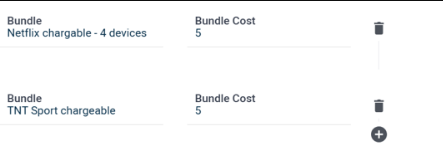
At the moment, you need to add each bundle or add-on one by one using the plus icon shown below, but we have identified an issue whereby the PCI/CS documents will only show one of each product if multiple are selected.(Please see screenshot in the “attachments” section)
What’s new from 26 June
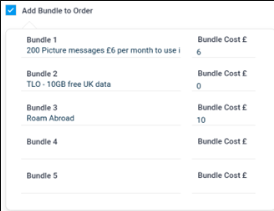
You’ll now see a tick box like on the screenshot below, once you tick the box, you can add all the bundles and add-on products the customer has purchased and everything will show correctly in the PCI/CS documents.
Changes coming to Lightico for EE Mobile.
From 26 June, there’ll be an important update to Lightico. It affects how you add bundles and add-on products for EE Mobile Flex Pay.
This change is mandatory to ensure the customer receives the correct Pre-Contract Information and Contract Summary (PCI/CS) which must include all of the products the customer has purchased.
What it looks like today
At the moment, you need to add each bundle or add-on one by one using the plus icon shown below, but we have identified an issue whereby the PCI/CS documents will only show one of each product if multiple are selected.
Flex Pay
What’s new from 26 June
You’ll now see a tick box like on the screenshot below, once you tick the box, you can add all the bundles and add-on products the customer has purchased and everything will show correctly in the PCI/CS documents.